
FanDraft Baseball 2026 is live
FanDraft has always been about recreating that in-person draft experience — the reactions, the debates, the chaos, and the fun.
We’re happy to announce that FanDraft Baseball ‘26 is now available!
The 2026 Changes & Additions
This offseason our focus has been on improving the flow and energy of draft night.
FanDraft has always been about recreating that in-person draft experience — the reactions, the debates, the chaos, and the fun. So much of our work this year went into small but meaningful improvements that make drafts feel smoother, more interactive, and more “alive,” while also tightening up stability and audio behavior behind the scenes.
You’ll notice fewer awkward pauses, cleaner audio transitions, and more control for commissioners when managing the room. And of course, we added a few new features designed specifically to create those fun, memorable moments that make live drafts great.
Features and updates in 2026:
End of Round Summary
Automatically displays a full-screen highlight at the end of each round calling out the Best Pick and Worst Pick.
Designed to spark reactions and debate without slowing things down.Take a Draft Break
Commissioners can now create an intermission and pause the draft at any time (non-auction leagues). Perfect for food runs, trades, or just giving everyone a breather.Walk-Up Song Fade Options
Added the ability to fade songs out after 15, 30, or 45 seconds for smoother pacing.Custom “Pick Is In…” Sound
You can now choose your own sound effect for the “Pick Is In” announcement.Improved Audio Handling
Tighter pausing of walk-up songs while the Voice Announcer is speaking for cleaner transitions.Auction Voice Announcer
The announcer now calls out when a player has been nominated during auction drafts.Auction Team Songs During Nomination Only
By default, songs now play during nomination and stop during bidding to reduce audio clutter (optional override available).Clock Extension Improvement
Clock extensions now add time to the remaining clock instead of resetting it.View Only Mode
Remote users can be restricted to view-only access, preventing accidental or unauthorized picks.
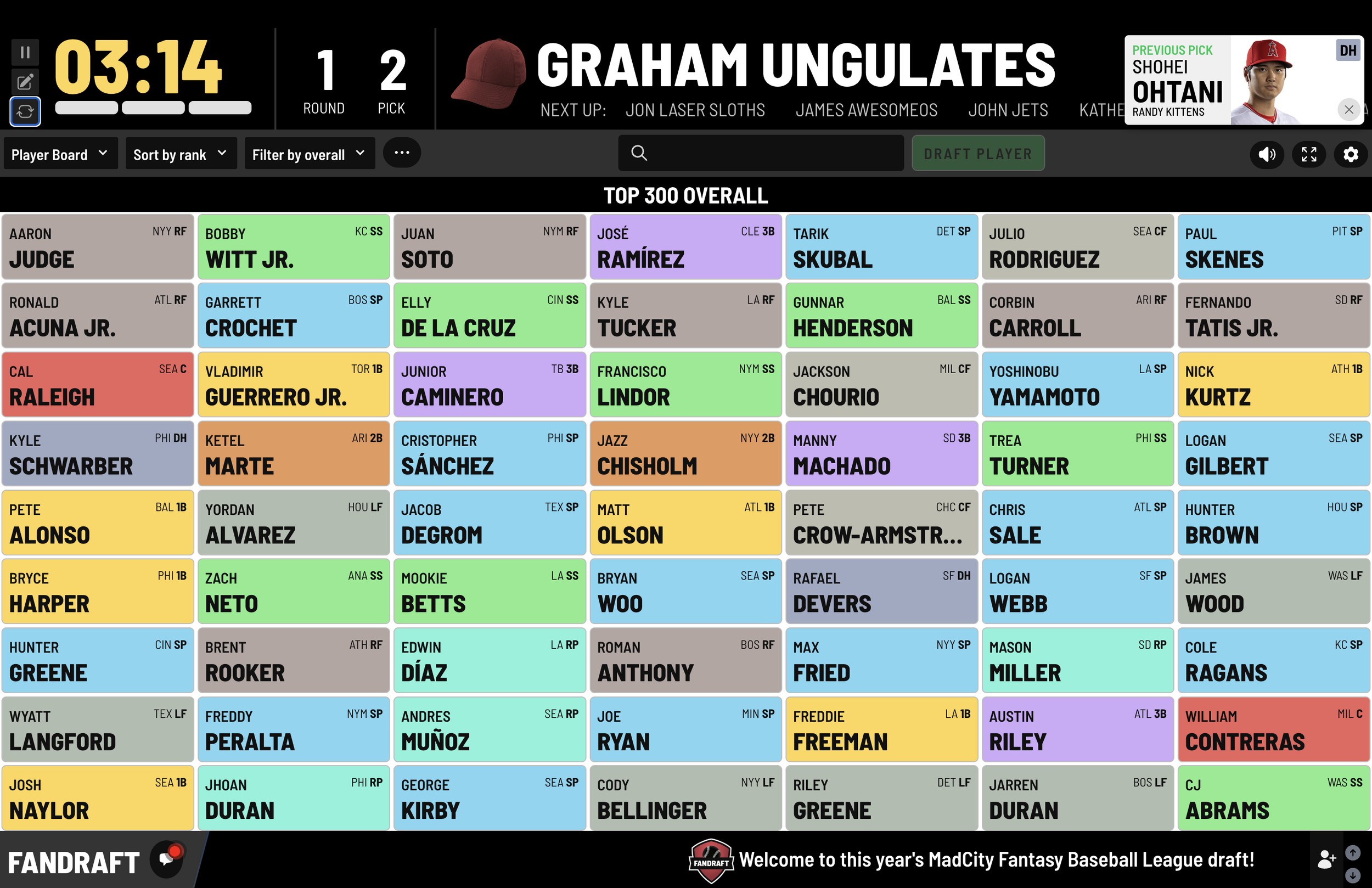
The Ultimate Guide to a Fantasy Baseball Draft Board
There are two kinds of fantasy baseball drafts.
The first kind happens quietly. Someone shares a spreadsheet. A few names get typed into tiny cells. Nobody knows who was taken three rounds ago. Someone asks, “Wait… did anyone draft a closer yet?” It’s fine. It works. It’s deeply unmemorable.
There are two kinds of fantasy baseball drafts.
The first kind happens quietly. Someone shares a spreadsheet. A few names get typed into tiny cells. Nobody knows who was taken three rounds ago. Someone asks, “Wait… did anyone draft a closer yet?” It’s fine. It works. It’s deeply unmemorable.
The second kind feels like Opening Day.
There’s a big draft board. Picks go up one by one. People clap, groan, and question life choices. There’s pacing. There’s structure. There’s drama. You can see the draft unfold in real time.
If you’ve ever Googled “fantasy baseball draft board,” you already know which version you want.
This guide will walk you through everything you need to know about setting up a fantasy baseball draft board — whether you’re running a classic in-person draft party, a hybrid draft with a few remote managers, or a fully online experience.
Let’s build a draft night your league actually remembers.
What Is a Fantasy Baseball Draft Board?
A fantasy baseball draft board is the visual command center of your draft.
It shows:
Draft order
Rounds and picks
Team names
Player selections
Positional runs
Draft flow at a glance
In baseball especially — where drafts often run 20–30 rounds deep — a draft board isn’t just helpful. It’s essential.
Unlike fantasy football, where most leagues draft 15–18 rounds, fantasy baseball drafts can involve 250–350 players. That’s a lot of names. A lot of pitchers. A lot of “Wait, did someone take him already?”
A draft board prevents chaos. It keeps everyone aligned. And it makes the entire room feel like something bigger than just clicking buttons.
Why Fantasy Baseball Drafts Need a Board More Than Any Other Sport
Baseball drafts are long. Beautiful. Strategic. And occasionally exhausting.
Here’s why a proper fantasy baseball draft board makes such a difference:
1. Player Volume Is Massive
You’re drafting:
Starting pitchers
Relief pitchers
Closers
Catchers (which always spark debates)
Infielders across multiple positions
Outfield depth
Bench bats
With hundreds of players on the board, you need a way to track who’s gone — and who’s slipping.
2. Position Runs Happen Fast
One owner grabs a top closer.
Suddenly three more closers go in the next five picks.
If you don’t have a visible board, half the league doesn’t realize what’s happening until it’s too late.
A draft board lets everyone see trends forming in real time.
3. Draft Night Is an Event
Fantasy baseball drafts aren’t just administrative meetings. They’re rituals.
They deserve something that feels bigger than a spreadsheet.
Physical Sticker Boards vs Online Fantasy Baseball Draft Boards
If you’ve been in fantasy baseball for a while, you’ve probably seen the classic sticker draft board.
Big grid. Pre-printed player stickers. Sharpie in hand. Chaos at round 19.
Sticker boards have charm. They also have… limitations.
The Classic Sticker Board Experience
Pros:
Nostalgia
Tangible, physical experience
Great for in-person leagues
Cons:
Limited player pool
Hard to adjust for custom leagues
Stickers fall off
No draft clock
No auction tracking
No remote access
No automatic sorting
No easy export or recap
And once the draft ends? You take a photo of the board and hope it’s readable.
The Modern Online Fantasy Baseball Draft Board
An online fantasy baseball draft board keeps the big-board energy — without the sticker-sheet headaches.
A good digital draft board should offer:
Large visual grid display
Custom team names and logos
Snake or auction format support
Draft clock
Remote access for owners
Multiple display layouts
Full player database
Exportable results
It preserves the spectacle while removing the friction.
How to Set Up a Fantasy Baseball Draft Board for an In-Person Draft
If your league drafts together in the same room (the best kind), here’s how to elevate the experience.
Step 1: Choose Your Display
Options:
Large TV
Digital projector on a wall
Conference room display
Garage wall draft setup
Basement big screen
The bigger the better. Everyone should be able to see picks clearly from anywhere in the room.
Step 2: Structure the Draft Flow
Decide in advance:
Snake or auction?
How many rounds?
Time per pick?
Tiebreaker rules?
Keeper format (if applicable)?
For baseball drafts, 60–90 seconds per pick works well in snake formats. Auctions benefit from a visible countdown clock.
Step 3: Create Atmosphere
Draft night energy matters.
Some leagues add:
Custom team logos
Walk-up songs when picks are made
A streaming ticker across the screen
Countdown sounds for the draft clock
Highlight animations for picks
The more immersive the draft board feels, the more engaged everyone stays — even in round 23.
How to Run a Hybrid or Fully Online Fantasy Baseball Draft
Not every league can gather in one room.
You might have:
One owner out of state
Two owners on vacation
A fully remote league
A mix of in-person and remote managers
This is where an online fantasy baseball draft board becomes essential.
A strong platform should allow:
Unlimited remote access
Real-time synced picks
Shared draft board view
Live updates without refreshing
Chat integration
Smooth auction bidding
The key is keeping remote owners just as immersed as those in the room.
When done correctly, nobody feels like they’re “on the outside” of the draft.
Snake vs Auction: Why Your Draft Board Must Support Both
Snake Drafts
In a snake draft:
Picks reverse every round.
You need a clear round-and-pick layout.
Owners must see upcoming picks.
Visual boards help managers plan two picks ahead — especially when drafting at the turn.
Auction Drafts
Auction drafts are a different beast entirely.
They require:
Budget tracking
Real-time bid updates
Clear nomination display
Visible countdown clock
Automatic salary deduction
Trying to run an auction draft manually with a whiteboard? Bold choice.
A dedicated auction fantasy baseball draft board prevents arguments, miscounts, and “Wait, what was the high bid?”
What Makes a Great Fantasy Baseball Draft Board?
Whether physical or digital, the best draft boards share these qualities:
✔ Visibility
Everyone can see picks clearly.
✔ Structure
Rounds and picks are organized and easy to follow.
✔ Accuracy
No guessing who drafted whom.
✔ Flow
Picks move quickly and smoothly.
✔ Engagement
It feels like an event — not a spreadsheet.
Common Draft Board Mistakes to Avoid
No draft clock
Baseball drafts are long. Without a clock, they get longer.Poor visibility
If owners are squinting, you’ve lost them.Not accounting for remote managers
Hybrid leagues need full online capability.Overcomplicating the setup
The board should simplify your draft — not create more work.No backup plan
Always have Wi-Fi tested. Always have a charger. Always.
Turning Your Fantasy Baseball Draft Into an Experience
The best fantasy baseball draft boards don’t just track picks.
They create atmosphere.
Imagine this:
Custom league logo displayed across the screen
Team logos next to each owner
Walk-up music when a pick is submitted
A draft clock counting down dramatically
A ticker streaming across the bottom of the screen
Multiple board display layouts for different views
Now imagine exporting that display to a large TV or digital projector so your entire league can follow every pick together.
That’s not just a draft.
That’s a production.
And if a few managers can’t attend? Or your entire league drafts remotely? A fully online fantasy baseball draft board lets everyone share in the same immersive experience — no matter where they are.
Why Your Draft Board Sets the Tone for the Entire Season
Draft night is the only time your entire league is fully engaged at the same moment.
It sets:
Competitive tone
League culture
Trash talk level
Energy for the year
A sloppy draft leads to a sleepy season.
A well-run draft board creates momentum that carries through Opening Day and beyond.
Final Thoughts: Don’t Let Your Draft Feel Small
Fantasy baseball drafts are deep. Strategic. Methodical. Sometimes chaotic. Always memorable.
They deserve:
Structure
Visibility
Energy
Flow
Immersion
If you’re running a fantasy baseball draft — especially for an in-person league — a proper fantasy baseball draft board transforms the night from “let’s get this over with” to “this is our annual event.”
If you’re ready to elevate your draft experience — whether it’s a live draft party on a big screen or a fully remote league — you can try a full-featured fantasy baseball draft board completely free:
👉 Start your FanDraft Fantasy Baseball Draft here:
https://fandraft.app/register?sport=baseball
Make this year’s draft feel like the real thing. ⚾
How to Run a Fantasy Baseball Draft Party That People Actually Enjoy
There is a moment in every fantasy baseball season that matters more than Opening Day.
Draft night.
There is a moment in every fantasy baseball season that matters more than Opening Day.
Draft night.
It is the one time all year when your entire league is locked in, fully present, slightly overconfident, and ready to debate whether taking a closer in Round 6 is genius or reckless.
If you are the commissioner, this night is on you.
A fantasy baseball draft party can either feel like a legendary annual tradition or like a three-hour meeting that nobody wants to repeat next year.
Let’s make sure it is the first one.
This guide will walk you through how to run a fantasy baseball draft party that is organized, immersive, and actually fun for everyone involved.
Step 1: Decide What Kind of Draft Party You’re Hosting
Before you buy snacks or print draft sheets, decide what kind of experience you want.
There are three common formats:
1. Classic In-Person Draft
Everyone in the same room. Big screen. Loud reactions. Trash talk flowing.
This is the gold standard.
2. Hybrid Draft
Most managers are together, but a few are remote. You need something that works equally well on a big screen and online.
3. Fully Online Draft Party
Everyone is remote but you still want it to feel like an event, not just clicking buttons alone in a quiet room.
Each format works. The key is planning for it intentionally.
Step 2: Make the Draft Board the Centerpiece
If you want your fantasy baseball draft party to feel real, the draft board needs to be visible and dramatic.
This is not a spreadsheet moment.
You want something displayed on:
A large TV
A digital projector
A conference room display
A garage wall if that is your league’s vibe
Everyone should be able to see:
The full draft grid
Team names
Picks as they happen
Upcoming selections
Baseball drafts are long. Many leagues draft 20 to 30 rounds. That can mean more than 300 players selected.
Without a visible fantasy baseball draft board, things get messy quickly.
With one, the entire room stays engaged.
Step 3: Set the Pace With a Draft Clock
Nothing kills draft night energy like one manager staring at rankings for five straight minutes while everyone else debates pizza toppings.
Use a draft clock.
For snake drafts:
60 to 90 seconds per pick works well.
For auction drafts:
A visible countdown during bidding keeps things moving and adds tension.
The clock keeps the draft sharp and prevents it from drifting into marathon territory.
Step 4: Plan the Physical Setup
Think through logistics before draft night.
Seating
Make sure everyone can see the screen without twisting like they are watching a tennis match.
Internet
Test WiFi beforehand. Especially if your draft board is online.
Power
Have extension cords ready. Someone will forget to charge a laptop.
Sound
If you are using walk-up music or draft sounds, test audio levels before people arrive.
Little details separate an average draft from one that feels polished.
Step 5: Add Personality to the Draft
Fantasy baseball draft parties should feel like an event.
Here are a few ways leagues elevate the experience:
Custom team logos displayed on the board
Walk-up songs when picks are submitted
A streaming ticker showing picks across the screen
Countdown sounds during the draft clock
Highlight animations for big selections
You do not need all of this. But adding even one or two elements transforms the room.
The draft suddenly feels less like admin work and more like a production.
Step 6: Feed People Properly
This sounds obvious. It is not.
Long fantasy baseball drafts mean hungry managers. Hungry managers make bad picks.
Decide ahead of time:
Order pizza?
Grill outside?
Potluck?
Snack table?
Beer only?
Full bar situation?
Whatever you choose, plan it.
Do not leave food as a mid-draft debate.
Step 7: Prepare for Remote Managers
Even in strong in-person leagues, someone always has a wedding, vacation, or work conflict.
If you have remote managers:
Make sure they can see the draft board in real time.
Make sure their picks update instantly.
Test login access before draft night.
Have a group chat or voice channel open.
Remote owners should feel like they are in the room, not calling in from the sidelines.
A fully online fantasy baseball draft board makes hybrid drafts dramatically easier to manage.
Step 8: Choose Snake or Auction Intentionally
The structure of your draft party changes based on format.
Snake Draft Party Vibe
Faster pacing
Predictable draft order
Easier for newer leagues
Strong round-by-round rhythm
Auction Draft Party Vibe
Louder
More intense
Strategic budget management
Bidding drama
If you are hosting an auction, make sure your draft board tracks budgets automatically. Manually updating budgets in the middle of a heated bidding war is how arguments begin.
Step 9: Have a Commissioner Game Plan
On draft night, the commissioner should not be scrambling.
Have this ready:
Draft order finalized
League settings confirmed
Roster positions clarified
Time per pick established
Tiebreaker rules defined
Backup internet plan
Confidence from the commissioner sets the tone.
If you look calm and prepared, the room feels organized.
Step 10: Keep the Energy Up in Later Rounds
The first five rounds are electric.
Round 18 can feel like a slow descent into catcher depth charts.
Here are ways to maintain energy:
Call out notable value picks.
Lightly roast questionable selections.
Celebrate positional runs.
Keep the draft clock visible.
Play short walk-up sounds for each pick.
When the draft board is visually engaging, even later rounds feel active.
Why the Draft Board Changes Everything
A strong fantasy baseball draft party hinges on one thing.
Visibility.
When everyone can see the board clearly:
Strategy improves.
Reactions are louder.
Owners stay engaged.
The draft moves faster.
The night feels structured.
Without a proper fantasy baseball draft board, you are basically running a meeting.
With one, you are hosting an event.
Turning Your Draft Party Into a Tradition
The best leagues treat draft night as an annual holiday.
It becomes:
A scheduled weekend every year.
A reason to gather.
A memory builder.
The unofficial start of baseball season.
The draft board is the stage. Everything else is supporting cast.
If you want your fantasy baseball draft party to feel like the real thing with custom logos, team walk-up songs, a streaming ticker, draft clock, and multiple board display options, there is an easy way to make that happen.
FanDraft allows you to export the draft board display to a TV or projector for your entire league to enjoy. It works perfectly for in-person draft parties.
Have owners who cannot attend? Need to run the entire draft remotely? It is a fully online application, so any number of managers can draft from anywhere and share in the same immersive experience.
If you are ready to take your fantasy baseball league’s draft to the next level, you can try it free here:
https://fandraft.app/register?sport=baseball
Make draft night something your league talks about all season. ⚾
Online Fantasy Baseball Draft Board vs Sticker Boards: Which Is Better?
If you have ever stood in front of a giant fantasy baseball draft board with a sheet of player stickers in your hand, you know the feeling.
If you have ever stood in front of a giant fantasy baseball draft board with a sheet of player stickers in your hand, you know the feeling.
It feels official. Important. Slightly chaotic.
There is something nostalgic about peeling off a tiny sticker and slapping it onto a big grid while the room reacts.
But here is the real question.
Is a classic sticker draft board actually the best way to run a fantasy baseball draft anymore?
Or has the online fantasy baseball draft board quietly taken over for good reason?
Let’s break it down.
The Case for the Classic Sticker Draft Board
Sticker boards have been part of fantasy sports culture for decades. They show up in garages, basements, conference rooms, and back patios every spring.
Here is why leagues still love them.
1. The Nostalgia Factor
There is something satisfying about physically placing a player’s name on the board. It feels ceremonial. It feels earned.
For long-running home leagues, the sticker board can feel like part of the tradition.
2. It Looks Impressive
A full-sized draft board with 25 rounds and 12 teams looks serious. It fills a wall. It draws people in.
When friends walk into the room, they immediately know what is happening.
3. It Forces Everyone to Pay Attention
With a physical board, everyone is looking at the same wall. No one is buried in a phone screen. It creates a shared focus.
For purely in-person leagues, this still has appeal.
The Hidden Problems With Sticker Boards
Now let’s talk about what usually happens by round 17.
1. Limited Player Pool
Most sticker boards come pre-printed. That means you are limited to the players included in the kit.
Fantasy baseball drafts often go 20 to 30 rounds deep. That can mean 250 to 350 players selected.
If your league drafts prospects, deep sleepers, or has larger rosters, you will quickly run into the dreaded blank sticker situation.
Then someone writes a name in Sharpie. Then someone else cannot read it. Then confusion begins.
2. No Built-In Draft Clock
Sticker boards do not keep time.
That means the commissioner is either:
Yelling out time warnings
Staring at a phone timer
Or letting picks stretch into eternity
In a long fantasy baseball draft, pacing matters. Without structure, energy fades.
3. No Remote Capability
If even one owner cannot attend in person, things get messy.
You end up:
Texting picks
Calling someone on speakerphone
Waiting while someone reconnects
Sticker boards were built for fully in-person leagues. Hybrid leagues expose their limits quickly.
4. Auction Draft Headaches
Running an auction fantasy baseball draft on a physical board is ambitious.
You must:
Track budgets manually
Write in player salaries
Update totals in real time
Avoid math mistakes during bidding wars
One small error and you have an argument.
The Rise of the Online Fantasy Baseball Draft Board
An online fantasy baseball draft board keeps the big-board energy but removes most of the friction.
Instead of peeling stickers, picks update instantly on screen.
Instead of guessing who has been drafted, the full board is visible at all times.
Instead of manually tracking budgets, everything calculates automatically.
The key difference is control.
What an Online Fantasy Baseball Draft Board Does Better
1. Unlimited Player Database
Deep league? No problem.
Prospects? Included.
Late-round dart throws? Available.
You are not limited to what was printed months ago.
2. Real-Time Updates
Every pick appears instantly for everyone to see.
No handwriting issues. No misplacing stickers. No confusion.
3. Built-In Draft Clock
Set time per pick and let the board handle it.
It keeps snake drafts moving and adds tension to auction bidding.
4. Hybrid and Remote Friendly
An online fantasy baseball draft board allows:
In-person display on a large TV or projector
Remote managers drafting from anywhere
Real-time syncing for everyone
Nobody feels left out.
5. Multiple Display Options
You can choose different draft board views depending on what you want to highlight.
Full grid. Compact view. Auction focus. Large screen display.
It adapts to your setup.
Does Online Mean Less Fun?
Some commissioners worry that moving away from stickers removes the charm.
The opposite is usually true.
When the draft board is displayed on a large TV or projected onto a wall, the room still gathers around it.
But now you can add:
Custom team logos
Walk-up songs when picks are submitted
A streaming ticker across the screen
A visible draft clock counting down
Instead of reducing energy, the online board amplifies it.
It feels closer to a live broadcast than a spreadsheet.
When Sticker Boards Still Make Sense
To be fair, sticker boards are not useless.
They work well when:
Your league is small
Everyone drafts in person every year
You enjoy the manual process
You do not run auction formats
You do not need advanced features
For some leagues, that is enough.
But as soon as your league grows, adds complexity, or includes remote owners, limitations start to show.
The Real Question to Ask
When deciding between a sticker board and an online fantasy baseball draft board, ask this:
Do we want draft night to feel nostalgic or polished?
Nostalgia is fun. Polished is powerful.
With a modern online board, you keep the visual experience but gain:
Structure
Accuracy
Speed
Immersion
Flexibility
That combination makes a big difference in baseball drafts, where length and depth amplify every small inefficiency.
Why Baseball Drafts Benefit the Most From Going Digital
Fantasy football drafts are shorter. They can survive some inefficiency.
Fantasy baseball drafts are marathons.
More rounds. More players. More strategy.
The longer the draft, the more valuable automation becomes.
An online fantasy baseball draft board prevents fatigue from turning into frustration.
It keeps the room focused even in the late rounds.
Final Verdict: Which Is Better?
If your league is fully in-person, simple, and deeply attached to tradition, a sticker board can still work.
If you want:
A smoother draft
Cleaner tracking
Built-in timing
Auction support
Remote access
Large-screen immersion
An online fantasy baseball draft board wins.
You do not have to give up the big-board feel. You just upgrade how it runs.
If you are ready to run a fantasy baseball draft that looks great on a TV or projector and works just as well for remote managers, you can try a full-featured draft board free here:
https://fandraft.app/register?sport=baseball
Draft night should feel like Opening Day. Make sure your board is ready for it. ⚾
Auction Fantasy Baseball Draft Board: What You Need to Know Before Draft Night
Auction fantasy baseball drafts are not for the faint of heart.
Snake drafts are orderly. Predictable. Calm, even.
Auction drafts are loud. Strategic. Emotional. Occasionally unhinged.
If you are running an auction league, your draft night is going to move fast, get intense, and test everyone’s math skills at least once.
That is exactly why your auction fantasy baseball draft board matters more than ever.
Here is what you need to know before draft night.
Why Auction Fantasy Baseball Drafts Are Different
In a snake draft, you wait for your turn.
In an auction draft, every manager is involved in every player.
Every nomination is an opportunity.
Every bid is a statement.
Every dollar matters.
You are not just drafting players. You are managing a budget, reading the room, and adjusting strategy in real time.
Because of that, auction drafts require structure.
A strong auction fantasy baseball draft board keeps everything organized while the room gets chaotic.
The Core Elements of an Auction Fantasy Baseball Draft Board
If you are running an auction draft, your board must handle more than just picks.
It should clearly display:
Team names
Remaining budgets
Nominated player
Current high bid
Countdown clock
Player salary once sold
Total roster spending
Remaining roster spots
Without this information visible to everyone, things fall apart quickly.
Budget Tracking Is Not Optional
In an auction fantasy baseball draft, every manager typically starts with the same budget. Most leagues use something like 260 dollars.
Now imagine tracking 12 managers spending from that budget over 23 roster spots.
Manually.
On a whiteboard.
In real time.
Someone is going to miscalculate.
Someone is going to overspend.
Someone is going to argue.
A proper auction fantasy baseball draft board updates budgets automatically after every winning bid.
No guessing.
No disputes.
No math debates in round 18.
The Draft Clock Is Your Best Friend
Auction drafts can spiral if you do not control pacing.
Here is what happens without a clock:
Two managers bid one dollar at a time.
The room gets distracted.
Side conversations start.
Momentum disappears.
A visible countdown clock adds urgency.
Five seconds left.
Three seconds.
Going once.
Going twice.
Sold.
It keeps bidding tight and dramatic instead of slow and messy.
Visibility Changes Strategy
In auction drafts, information is power.
If the entire room can see:
Remaining budgets
Who has the most money left
Who still needs a shortstop
Who already spent heavily on pitching
Strategy evolves.
Managers bid differently when they know only one other team can afford a top-tier outfielder.
A strong auction fantasy baseball draft board makes this information obvious.
That makes the draft sharper and more competitive.
Running an Auction Draft In Person
If your league drafts together, this is where things get fun.
Here is how to set it up properly.
Use a Large Display
Put the auction draft board on a large TV or projector so everyone can see:
Current nomination
High bid
Remaining budgets
Draft clock
This keeps all attention focused on the same screen.
Establish Nomination Rules
Before the draft begins, clarify:
Nomination order
Minimum opening bid
Bid increments
How the clock resets on new bids
Clarity up front prevents arguments later.
Keep the Room Engaged
Auction drafts thrive on energy.
Encourage:
Calling out bids clearly
Announcing remaining budgets occasionally
Celebrating aggressive nominations
Light trash talk
The draft board supports the structure so the room can enjoy the chaos.
Running a Hybrid or Fully Online Auction Draft
Auction drafts get complicated fast when managers are remote.
You cannot rely on someone shouting bids across a phone call.
An online auction fantasy baseball draft board allows:
Real-time bidding from anywhere
Instant updates to budgets
A synchronized countdown clock
Clear visibility for all managers
No delays.
No confusion.
No texting bids to the commissioner.
Every manager participates equally, whether in the room or across the country.
Common Auction Draft Mistakes
1. Not Tracking Budgets Clearly
If managers cannot see remaining budgets at all times, strategy suffers.
Transparency keeps bidding fair and competitive.
2. No Visible Clock
Auction drafts without a timer feel endless.
3. No Nomination Plan
Some leagues rotate nominations. Others go in draft order. Decide beforehand.
4. Letting the Draft Drag Early
If your first few players take fifteen minutes each, the draft will stretch into the night.
Set a pace and stick to it.
Why Auction Draft Boards Need More Features Than Snake Boards
Snake drafts are structured by default.
Auction drafts require the board to manage:
Money
Timing
Nomination tracking
Salary recording
Budget adjustments
That is a lot of moving parts.
A well-built auction fantasy baseball draft board handles those mechanics in the background so managers can focus on strategy.
Turning Your Auction Draft Into an Event
Auction leagues often take pride in being more serious and more strategic.
Lean into that.
Display:
Custom team logos
Draft clock countdown
Player highlight animations
Streaming ticker with completed purchases
When the room sees a nominated player appear on a large screen with budgets updating live, it feels like a live sports broadcast.
That kind of immersion keeps managers locked in, even deep into the draft.
Why Structure Makes Auction Drafts More Fun
Some commissioners assume more structure means less excitement.
It is the opposite.
When the mechanics are clean and automated:
Bidding moves faster
Arguments disappear
Strategy sharpens
Energy stays high
The draft board becomes the referee, the accountant, and the stage all at once.
That frees the league to enjoy the competition.
Final Thoughts
Auction fantasy baseball drafts are one of the most exciting formats in fantasy sports.
They are strategic, unpredictable, and deeply satisfying when run well.
But they demand more from your draft setup.
If you are running an auction league and want automatic budget tracking, real-time bidding, a built-in draft clock, multiple display options, and the ability to project your board onto a TV for the entire room to see, there is a simple solution.
FanDraft gives you a full-featured auction fantasy baseball draft board that works perfectly for in-person draft parties and fully online leagues.
If you are ready to run a smoother, faster, and more immersive auction draft, you can try it free here:
https://fandraft.app/register?sport=baseball
Auction drafts should feel intense. Your draft board should be ready for it.
How to Run a Fantasy Baseball Draft Without Losing Your Mind
Running a fantasy baseball draft sounds simple.
Set a time. Invite your league. Pick players.
In reality, it is closer to directing a live event where twelve opinionated managers debate relievers for four hours.
Running a fantasy baseball draft sounds simple.
Set a time. Invite your league. Pick players.
In reality, it is closer to directing a live event where twelve opinionated managers debate relievers for four hours.
If you are the commissioner, draft night lives or dies based on your preparation.
The good news is this.
With the right structure and the right fantasy baseball draft board, you can run a smooth, organized draft that feels fun instead of chaotic.
Here is how to do it.
Step 1: Finalize League Settings Before Draft Night
This sounds obvious. It is often skipped.
Before anyone walks into the room or logs in remotely, confirm:
Snake or auction format
Number of teams
Roster positions
Bench spots
Scoring format
Draft order
Keeper rules if applicable
Nothing derails a fantasy baseball draft faster than discovering in Round 3 that half the league thought you were drafting five outfielders instead of three.
Send league settings out a few days before the draft.
Silence is approval.
Step 2: Choose the Right Draft Format for Your League
Fantasy baseball leagues generally choose between two formats.
Snake Draft
Draft order reverses every round
Easy for casual leagues
Predictable pacing
Lower barrier to entry
Auction Draft
Every manager can bid on every player
Requires budget tracking
More strategic
Higher engagement
Neither is better. They just create different experiences.
What matters most is making sure your draft board supports your chosen format cleanly.
Step 3: Set a Draft Clock
Baseball drafts are long. That is part of the charm.
But without a time limit, charm becomes exhaustion.
For snake drafts:
60 to 90 seconds per pick works well.
For auction drafts:
Use a visible countdown timer during bidding.
A draft clock keeps everyone focused and prevents one manager from staring at rankings while the rest of the room debates pizza again.
Step 4: Make the Fantasy Baseball Draft Board Visible
The draft board is the command center.
If you are running an in-person draft, display it on:
A large TV
A projector
A conference room screen
Even a garage wall setup
Everyone should clearly see:
Rounds and picks
Team names
Player selections
Upcoming picks
Budgets in auction formats
Baseball drafts often go 20 to 30 rounds deep. That can mean more than 300 players selected.
Without a visible fantasy baseball draft board, managers will constantly ask who is available.
With one, the entire room stays aligned.
Step 5: Prepare for Remote Managers
Even the most dedicated leagues have someone who cannot attend in person.
If your draft includes remote managers, make sure:
They can access the draft board easily.
Picks update in real time.
There is a group chat or voice connection.
You test everything before draft night.
Hybrid drafts work beautifully when the platform supports both in-room display and remote participation.
They are stressful when you are trying to text picks manually.
Step 6: Have a Commissioner Checklist
Before the draft begins, confirm:
Draft order is locked.
Internet connection is stable.
The draft clock is set correctly.
Auction budgets are correct if applicable.
Display setup works on your TV or projector.
Backup charger is available.
Running a fantasy baseball draft feels much easier when you are not troubleshooting mid-event.
Step 7: Keep Energy Up During Later Rounds
The first five rounds are electric.
Round 22 can feel like a slow search for middle relief depth.
Here are ways to maintain momentum:
Call out value picks.
Celebrate big reaches.
Keep the draft clock visible.
Encourage light trash talk.
Make sure the draft board updates quickly.
When the board is clean and easy to read, even late rounds feel active.
Step 8: Export or Save Results Immediately
After the final pick, do not rely on memory.
Make sure your draft board allows you to:
Export results
Save the draft recap
Share team rosters instantly
This gives managers something to review the next day when optimism is high and regret has not yet set in.
Step 9: Turn Draft Night Into an Event
Running a fantasy baseball draft does not have to feel administrative.
You can elevate it by adding:
Custom team logos
Walk-up songs when picks are submitted
A streaming ticker on the display
A visible draft clock counting down
Multiple board display layouts for different views
These details transform draft night from a meeting into an experience.
When you export the display to a TV or digital projector, the entire league can follow every pick together.
It feels structured. It feels immersive. It feels like the real thing.
Common Draft Night Problems and How to Avoid Them
Problem: The Draft Is Moving Too Slowly
Solution:
Use a visible draft clock and stick to it.
Problem: Confusion About Who Has Been Drafted
Solution:
Use a clear fantasy baseball draft board that updates instantly.
Problem: Remote Managers Feel Left Out
Solution:
Use a fully online draft board that syncs in real time.
Problem: Auction Budgets Get Miscalculated
Solution:
Let the draft board track budgets automatically.
The smoother the mechanics, the more fun everyone has.
Why Structure Makes Draft Night Better
Some commissioners think a looser draft feels more relaxed.
In reality, structure makes drafts more enjoyable.
When the format is clear and the board handles the mechanics:
Managers focus on strategy.
Picks move faster.
Arguments disappear.
Energy stays high.
A strong fantasy baseball draft board does not make the draft feel rigid.
It makes it feel professional.
Final Thoughts
Running a fantasy baseball draft does not have to be stressful.
With the right preparation, clear league settings, a visible draft clock, and a clean fantasy baseball draft board, you can host a draft night that feels organized and memorable.
If you want to make your fantasy baseball draft feel like the real thing with custom logos, team walk-up songs, a streaming ticker, draft clock, multiple display options, and full online support for remote managers, there is an easy way to do it.
FanDraft is a fully online fantasy baseball draft board that works perfectly for in-person draft parties and fully remote leagues.
If you are ready to run your draft without losing your mind, you can try it free here:
https://fandraft.app/register?sport=baseball
Draft night sets the tone for the season. Make sure yours starts strong.
7 Unique Features in FanDraft To Level-Up Your Live Draft
At FanDraft, we understand that there are alternative draft board options available. Certain leagues rely on paper draft boards, while others utilize their league management platform's draft room.
At FanDraft, we understand that there are alternative draft board options available. Certain leagues rely on paper draft boards, while others utilize their league management platform's draft room. Nevertheless, Commissioners who desire an exceptional draft party experience opt for FanDraft because it delivers an experience like none other.
Amidst the multitude of features provided by FanDraft, there might be a few that you haven't yet discovered. In the following list, we highlight these distinctive features that can be seamlessly integrated into your live draft, ensuring you host an unforgettable draft day.
1. Player Whammies
This can be an extremely fun addition for some leagues. Assign a set quantity of random players to be designated as "Whammy Players". During the draft when one of these mystery players is selected, a “Whammy” video will automatically play. Some leagues will penalize an owner that had the misfortune of selecting one of these players, by having them do something like "take a shot of alcohol".
2. Walk-Up Songs
If you aren’t already using this feature, you are missing out. This is best executed by allowing owners to select their own walk-up song(s), which will automatically play when the owner is on the clock.
3. Pre-Draft Presentation
There’s always some dead time before a draft, while owners are slowly arriving and getting settled in. Having the PreDraft run during this time is a great way to set the tone and start building anticipation for the draft.
4. Player Videos
A very new addition, this feature is very much for the power user. Best performed by creating some videos in iMovie (or whatever video editing software you use) and then uploading them to Vimeo or YouTube. These movies can be assigned to specific players and played when they are drafted.
5. Custom Sound FX
While FanDraft provides built-in sound effects, which can be played at any time, you can also customize a couple of them and use your own sounds.
6. "The Pick Is In..."
This feature really makes your owners feel like they are watching a real NFL draft.When turned on, once a player gets added to the queue a notifying audio sound and graphic will appear. This helps attract attention that a pick is about to be announced.
7. Draft Start Audio
This simple yet fun new feature kicks off the start of the draft with a little oomph.